


NY BioTrack Readiness Webinar

In Dutchie’s latest New York BioTrack webinar, Chelsea Nanawa, a Premium Solutions Strategist, emphasizes the importance of preparation for BioTrack integration. She outlines key resources, deadlines, and the necessity of accurate inventory data for a smooth transition. Retailers, cultivators, and manufacturers are guided on specific data requirements and best practices for managing their product catalogs. The webinar also highlights the importance of staying updated with OCM communications and utilizing available support resources. Overall, the session serves as a comprehensive guide for operators to ensure compliance and successful integration.
For remaining questions, reach out to ny-integrations-help@dutchie.com and for additional helpful resources and information check out Dutchie’s dedicated NY BioTrack Integration Help Page.
Key Takeaways: BioTrack Integration
- Meet OCM Deadlines: Operators must adhere to integration deadlines set by the OCM – August 1 for cultivators, microbusinesses, RO’s, and labs; September 1 for processors and distributors; and October 1 for retailers. Stay current by checking the OCM website.
- Update Inventory Data: Apply the correct BioTrack inventory types to all cannabis products. Ensure THC and CBD values are filled out for all inventory packages; blank fields will cause upload errors. Use Dutchie’s lab data wizard to bulk update.
- Prepare Driver & Vehicle Information: All transport vehicles and drivers must be entered in Dutchie Back Office with required data fields (e.g., VIN, plate, driver ID, etc.) before BioTrack integration. Start now to avoid onboarding delays.
- Specific Requirements for Cultivators & Manufacturers:
- Cultivators – must track plant additives using BioTrack-compliant units and set catalog items with the “is additive” flag.
- Manufacturers/Processors – must build ingredient catalog items using BioTrack-compliant units. Flip the “post ingredients after inventory conversion” flag to yes for proper BioTrack syncing.
- Utilize Support & Resources: Dutchie’s Help Center offers step-by-step guides, how-to videos, and walkthroughs to help you prepare for your BioTrack integration. For pre-integration questions, email ny-integrations-help@dutchie.com.
Full Transcript
Hi everyone, and welcome! Thank you for joining us today for the New York BioTrack webinar, where we’ll go over how to prepare for your integration to BioTrack. My name is Chelsea Nanawa, and I’m a Premium Solutions Strategist here at Dutchie. Let's dive into it!
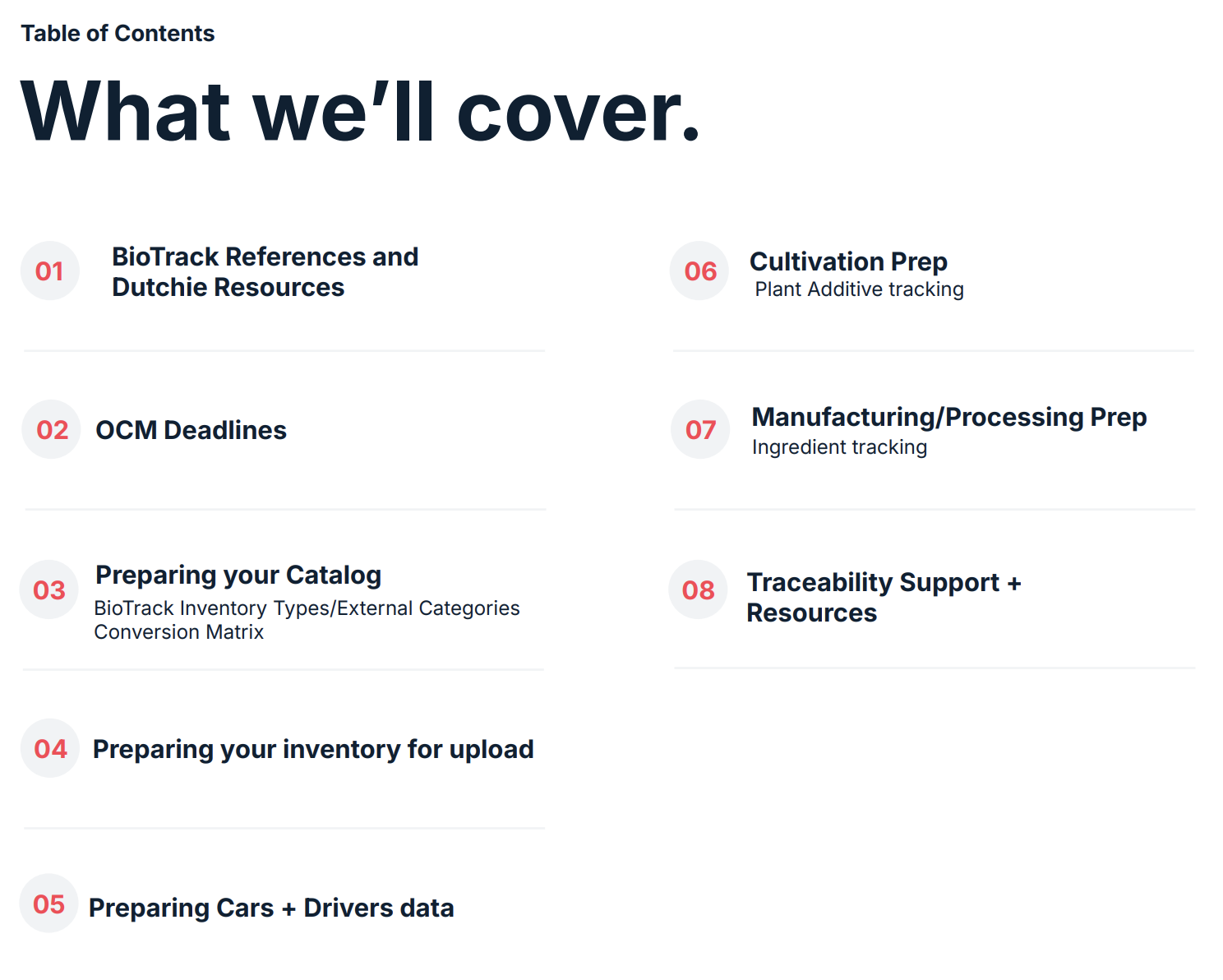
We'll be discussing a few key resources – where we're getting our information from, as well as your Dutchie resources that you can rely on while you're preparing for your integration into BioTrack. Another key topic we will discuss briefly is the OCM deadlines and the timeline to integrate into BioTrack, depending on your license type.
Changes to Expect and Helpful Resources
Then we'll go into the Dutchie side of things, what you can do to prepare your catalog – which is going to include talking about BioTrack inventory types, and in our system the external categories, as well as the conversion matrix. As you prepare to go live, you will also need to prepare your inventory data for upload. So, we will discuss what that means and what you can do to get that ready.
Of course, if you are a retailer who does deliveries or any sort of transport of cannabis goods from license to license, whether that's distribution or wholesale, you will also need to start preparing your cars and your drivers data in the Dutchie Back Office in order to push those records into BioTrack.
Last and certainly not least, there are going to be some changes for cultivators when it comes to plant additive tracking, and manufacturers and processors when it comes to ingredient tracking during conversions. We will wrap up this webinar with our resources that you can go to as you prepare to integrate, as well as any other resources outside of Dutchie that will help you during this transition.
Let's talk about where we're getting our information from. We have all of our information coming from BioTrack. I highly recommend all of the operators navigate over to BioTrack New York's landing page. There's going to be a section on their website called Traceability Training Webinars, that hosts all the webinars they've already had, and the supporting documentation and presentations on those webinars, which are extremely informative, especially depending on your license type. Highly recommend every operator goes through and reviews that documentation from BioTrack directly.
Now, of course, another site that I've pinged here is the OCM site. This is going to contain all of the information, including those deadlines and other helpful information such as how to order your digital tags and also points of contact for the OCM.
The last two bullets are going to be your Dutchie resources:
- Dutchie | State Laws | New York - Dutchie’s landing page for all compliance information – we keep this page up to date with tax information as well as any changes that have been made to the state compliance wise.
- Dutchie Health Center: New York | BioTrack Integration - We'll have the New York BioTrack integration page ramped up with step-by-step guides and how-to videos on preparation for this transition, as well as what to do on day one of the BioTrack integration.
Understanding OCM: Deadlines, Communication, & Inventory
Let's talk about deadlines. Depending on your license type, you will have a specific deadline to adhere to based on the OCM's guidelines on their website:
August 1st
- Licensed cultivators
- Micro businesses
- Registered organizations
- Permitted laboratories
September 1st
- Licensed processors
- Distributors
October 1st
- Licensed Retail Dispensaries
It is very important that you keep up to date with communication from the OCM should anything change with these deadlines, and also make sure that you're visiting their website.
So, what is a New York BioTrack inventory type and what does this mean in a BioTrack integration world? BioTrack tracks products based on the type of inventory it is, and the traceability ID. BioTrack will know, for example, a cannabis extract for inhalation is being sold at your facility and it is associated with this particular traceability ID number. It also tracks when you're doing adjustments on these packages, when you're doing destructions, any time you move packages from location to location. So these inventory types are going to be extremely important to get familiar with ASAP.
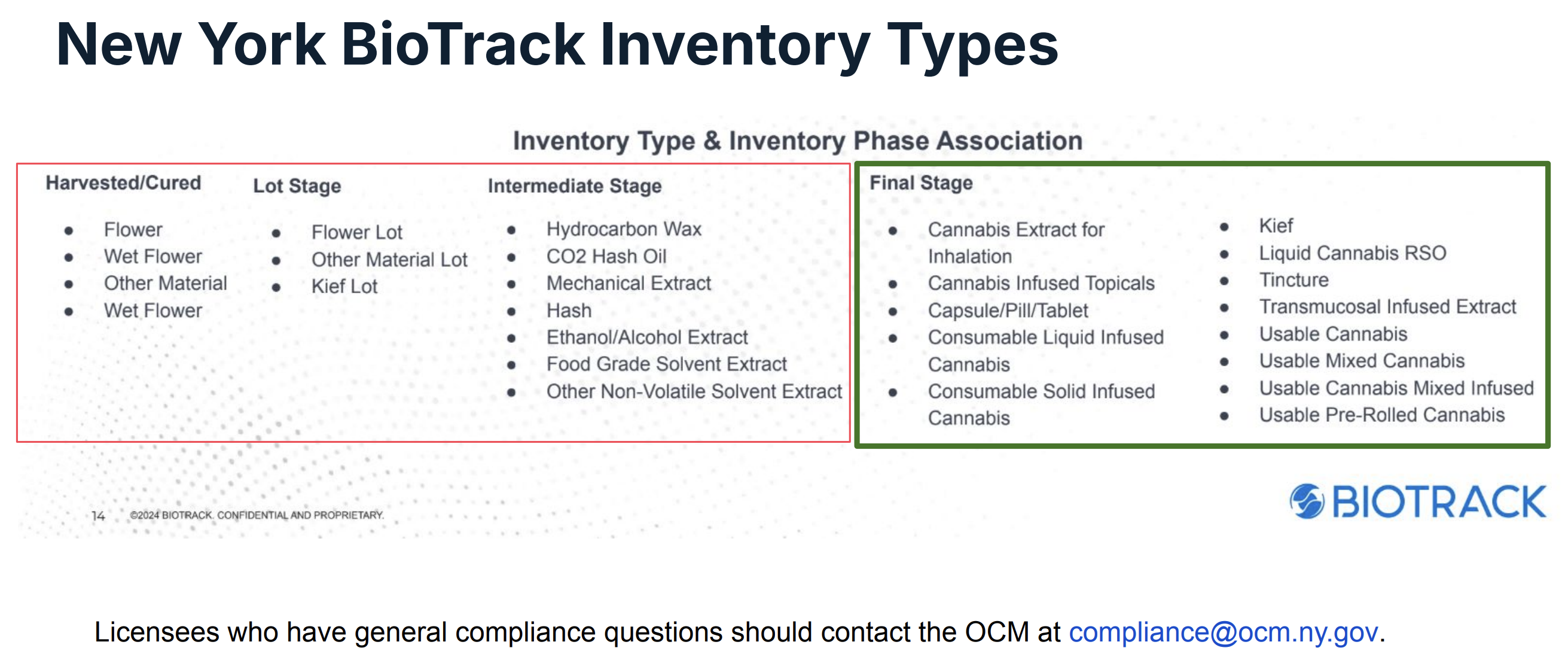
For retail operations – know that you can only use the FINAL STAGE inventory types.
You cannot use anything that's considered Harvested/Cured, Lot, or Intermediate Stage. Those are only to be utilized by cultivators and processors.
Why I stress the importance of this, is because if you don't do your research ahead of time, and, for example, see flower is listed and upload your prepacks as a flower inventory type, what's gonna happen is when you are live on BioTrack and try to sell those packages, you won’t be able to because that is not an approved inventory type for retail. It’s extremely important to get familiar with these inventory types.
These are also called the “external category” in Dutchie Back Office, and you will need to apply these external categories to all of your cannabis products in your catalog. Now, if you are uncertain what some of these categories mean or how to apply them to your products, our recommendation is to reach out to your state representative or you can contact the OCM for general compliance questions. They have provided a compliance inbox to the public compliance@ocm.ny.gov.
To piggyback on these inventory types, the BioTrack Conversion Matrix is really important for those who are doing conversions. Particularly manufacturers and processors. It is going to be imperative to understand what types of products can convert into another. We do have a high resolution file of this chart in our how-to guide on our help center, as well as within the BioTrack documentation.
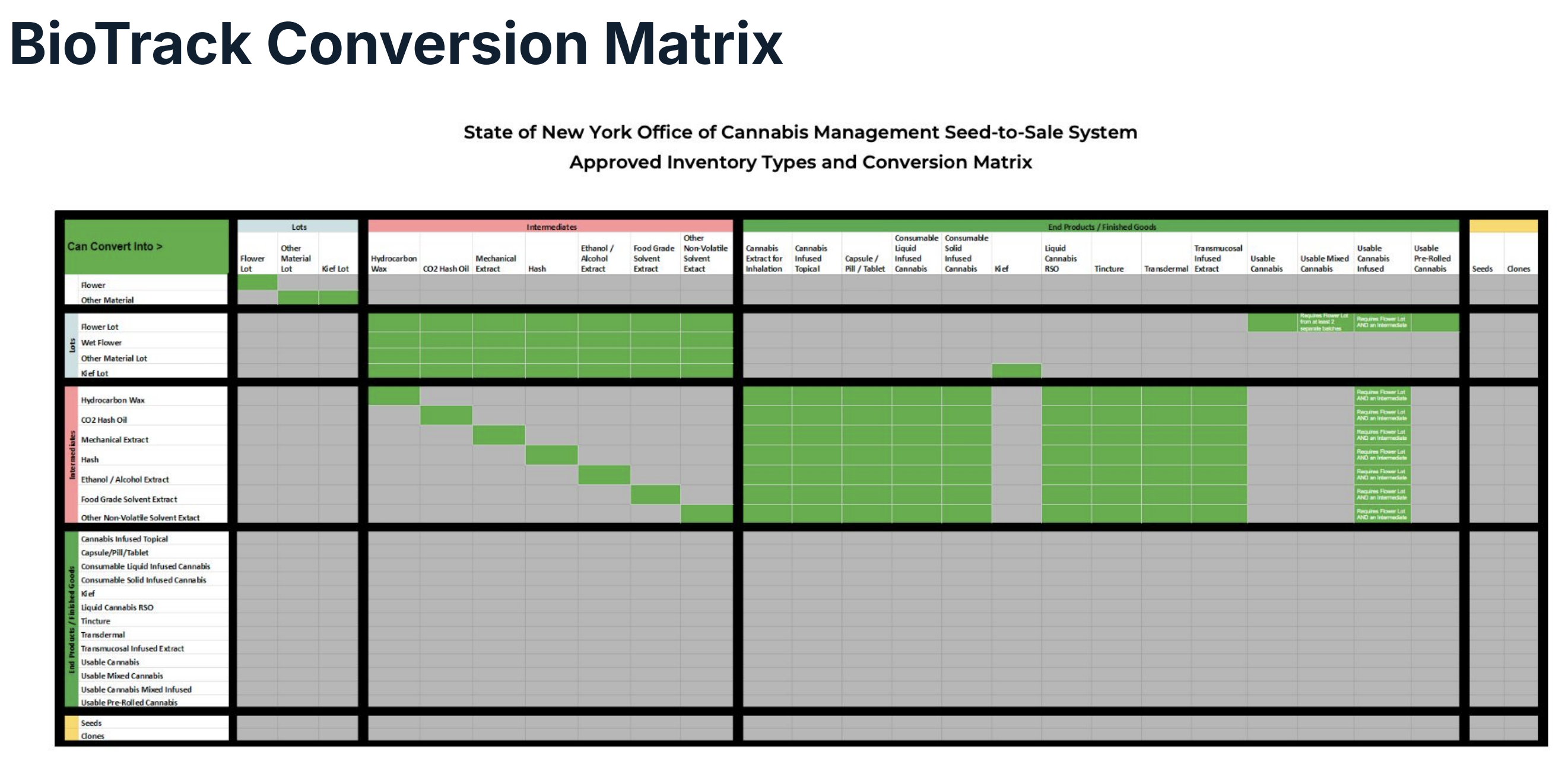
So just to quickly look at this chart here, we have a flower lot, right, that can be converted into any of these intermediate products, which would be bulk oil that you would then use to infuse into a tincture, an edible, a vape cartridge. You can't take a flower lot and immediately turn it into a vape cartridge. It has to go through its conversion cycle appropriately.
If you denote something as a finished good, so the bottom green box, these are reserved for retail products. You can't convert them any further and you can't convert backwards. Meaning if you have a finished good or marijuana extract for inhalation, you can't convert it back into an intermediate product. So if there were any mistakes made during the conversion process, a redo of the conversion will need to happen.
Make sure that you're looking at these charts and you're studying them thoroughly before you start doing any sort of conversions to your products.
Setting Up Inventory in Dutchie
This brings me into how we can start preparing all of these inventory types that I just talked about. So one thing we're doing for you all is we're allowing you to start setting this up on your product catalog today. Right now, do not wait. You can start doing this without BioTrack enabled.
You should start bulk updating your catalog with the appropriate external categories ASAP. I highly recommend that you start doing this now and you do not wait till you're cut over – so you're not stuck doing data management and you have your data just ready to go when onboard into BioTrack without any blockers. We have a recommended workflow here:
- Go under your products and catalog. I recommend using the category filter and searching for a category, or multiple categories, that can apply to a singular BioTrack inventory type. For instance, concentrates.
- Select all using the checkbox, use bulk actions, bulk edit, and then from here choose external category as the field. And then all of these products would apply down to the cannabis extract for inhalation category.
- Then save that, which will apply that category or external category to all of your products.
- From there, you would just repeat the process for each category in your catalog until you're done updating all cannabis products in your catalog with an appropriate inventory type.
If you are starting this and you don't see “external category” in the dropdown on the bulk edit screen or you don't see it showing up on your catalog, chances are you need to set it to “show” under products, configure and field. Most of the time it's set to hidden. You can even set it to “required if cannabis”, as well.
After you have your catalog prep work done, let's talk about what you can do for your inventory packages. I highly recommend you start using your THC and CBD values in your lab results. It is best practice to have lab results assigned with your cannabis inventory anyway. So if you're not doing this now, I would recommend you start doing it as a best practice where you have THC and CBD test results entered in all cannabis packages. If you use more cannabinoids in your profile and terpenes, that's fine too. But the purpose of this is we need to make sure that, bare minimum, THC and CBD values are filled in on all cannabis inventory packages.
What does it mean if I don't have any CBD detected in my cartridge? That's fine, but we still need a value in that field. So best practice is to enter in just a zero on CBD if there was none detected, but you cannot leave it blank. Okay, BioTrack will reject an upload of your packages if one or both are missing some sort of data in the lab results field.
How can you start managing this? How can you start auditing your inventory? The first recommendation is to head over to the reports in Back Office and under overview, make sure you search for the “current inventory lab results” report and then make sure you hit the run button too. You can export that report and then drill down and filter out for any blanks in the THC or CBD values on your cannabis packages.
You can also look at this directly onto your inventory table in the Dutchie Back Office. On the inventory table far right, you should see a cogwheel where you can enable certain column views. I recommend to enable the THC and CBD column views, maybe put them side by side, and then filter for any blanks directly on your inventory table and start updating those now.
What if you have hundreds of packages that need updates? We have a tool for that. We have a lab data wizard tool that will allow you to bulk update your labs. However, it's super important that you review the help center and the walkthrough video we have available on this tool so you fully understand how it works and any limitations with the tool as well.
One thing that you should also be aware of when you're ready to integrate and about to start uploading your packages into BioTrack is that any packages allocated in an open cart or an open manifest that hasn’t been closed out yet will need to be removed from the cart or manifest and put back into inventory.
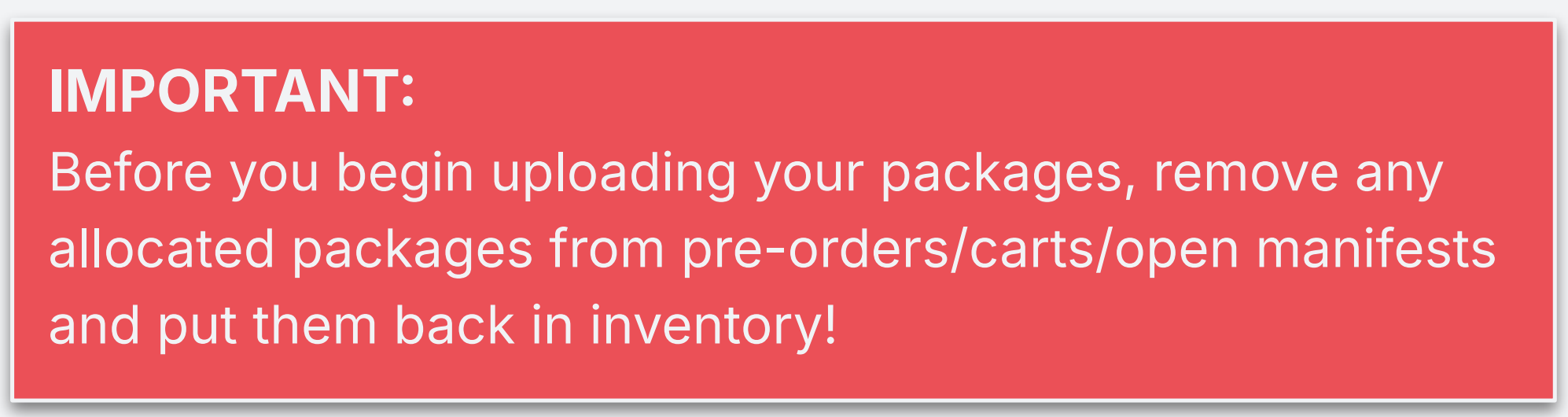
The reason for this is our upload functionality will upload anything that's unallocated and sitting in your active inventory. It does not account for allocated packages. So if you forget to remove packages sitting in a cart, or on a manifest, and you do the upload, your accounts are immediately going to be off with BioTrack because you missed the packages that are sitting elsewhere. So just a really important note is you will want to make sure to allocate your packages before you start the upload process.
Data Preparation for Transport
For those of you who transport cannabis, especially retailers who do home deliveries, or wholesalers and distributors that are constantly transporting finished goods from license to license, you will need to start preparing your cars and drivers data in the Back Office.
There's going to be very specific data points that you need to fill in on your cars and your drivers to prepare to push them into the BioTrack system. Let's talk about what those data points are.
For cars:
- Name of the vehicle
- Make of the vehicle
- Model of the vehicle
- License plate & state
- VIN number
- Year & color
For Drivers:
- Name
- DOB
- Date of Hire
- State ID Number (Drivers License Number)
- License State
Please make sure you're going through your data now. If you have to go through and fill out all of these fields while you're ready to integrate, and you're holding up the line because you have twenty cars and several drivers to update, it's not going to be a good experience for you when you onboard. This is something that I highly encourage you to start doing today. And all of these fields are visible in your Back Office. You can start updating your cars and drivers now.
Cultivators & Manufacturers
Cultivators, you are not out of the woods – there's going to be a new requirement in your workflow.
This requirement is plant additive tracking. What does this mean? How do we go about this? Cultivators, you will need to start tracking any additives you add to your plants. This could be nutrients or pesticides. Whatever you're adding to your plants during the growth cycle will also need to be tracked in a BioTrack environment.
To do this, you will need to start building plant additives in the catalog. You can give it a name, nutrient A, nutrient B, but an important call out here is BioTrack requires nutrients to be in very specific units of measure – grams, milligrams, kilograms, ounces, pounds, and quantity are all of the acceptable units of measure for an additive.
When you're creating this on your catalog, there's going to also be a flag that says “is additive”. You want to flip that to yes. So when you're in the cultivation module, it will know that this catalog, and its associated inventory, is an additive that can be applied to the plants. Like I mentioned with the external category field, if you don't see it on your catalog, make sure you set it to “show” under products, configure and fields.
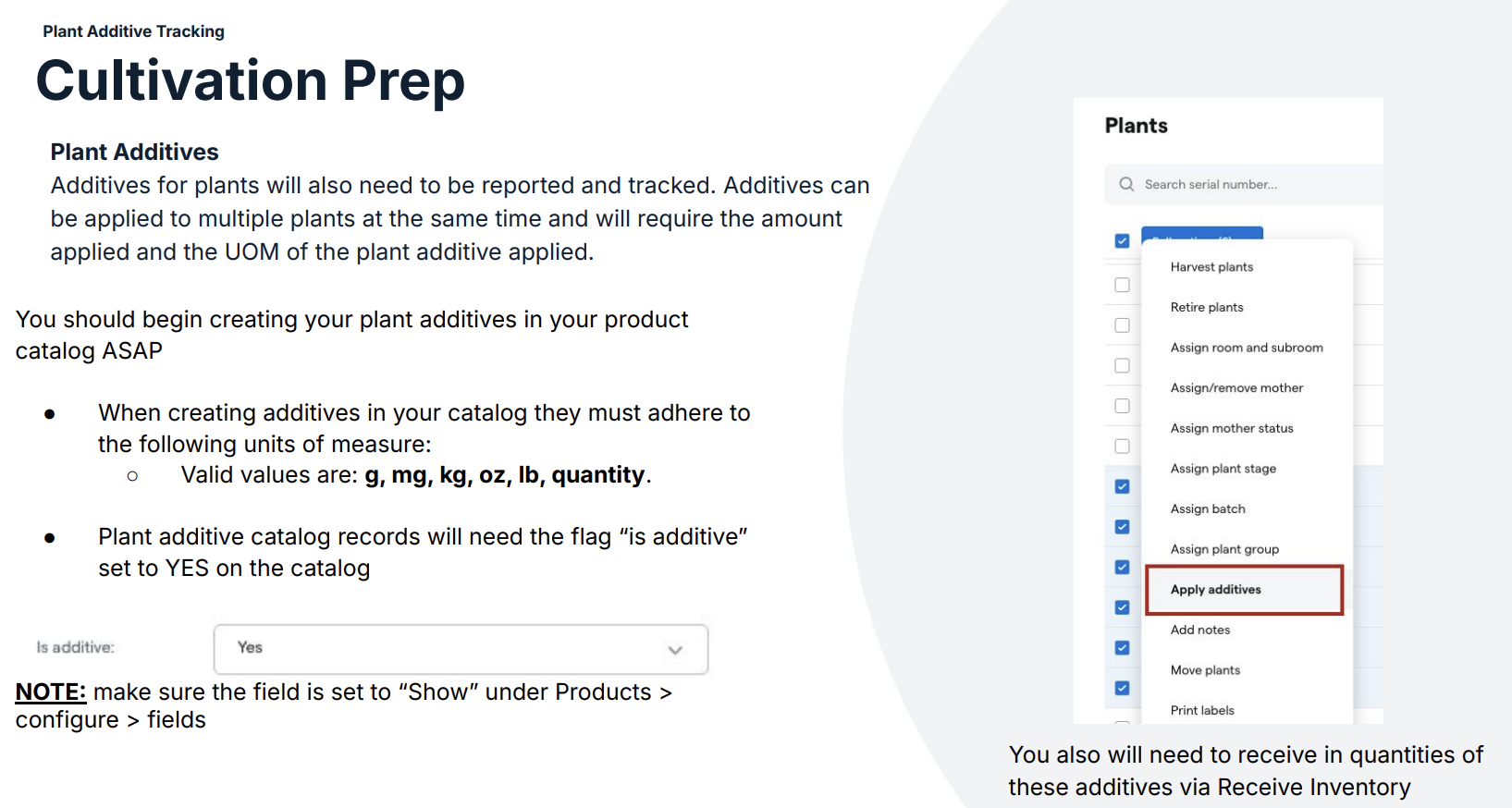
That's not the only step. You build the catalog product first. Once you have your catalog data built, you will need to go through receive inventory and manually receive in the quantities of additives that you actually have on hand, because otherwise the system won't know how much to apply or how much to pull from. When you go to the plants module and you click on that apply additives functionality, it needs to pull from an active inventory package. So build the catalog product, receive in the quantities of additives you have on hand, and then you'll be able to start doing additive tracking in the BioTrack world.
Manufacturers and processors, you're also not out of the woods. There is going to also be a sense of tracking in your operations. And for manufacturers and processors who do any sort of conversions into finished goods, you will need to start tracking ingredients as well in these conversions.
So what does that mean for you all? That also means, similar to the plant additives, you will need to add catalog products for your ingredients. If we're a heavy edible maker – eggs, flavorings, any additional terpenes that you're adding to the finished good – you will need to start cataloging products for your ingredients. And they also have a very specific units of measure that the BioTrack API allows, and that is going to be liter, gallon, fluid ounces, milliliter, grams, kilograms, milligrams, ounces and pounds.
So if you have, for example, packaging already or you track your packaging like label paper or Mylar bags that you're putting your goods in, you can still continue to do so. They just won't get posted to BioTrack as an active ingredient. Keep that in mind, get the data work done, get the ingredients made in your catalog. Make sure that when you make it on your catalog, that the flag that says “is cannabis” is set to no so that we know it's not an active cannabis ingredient and it will be posted to BioTrack after the conversion just as a normal non-cannabis ingredient.
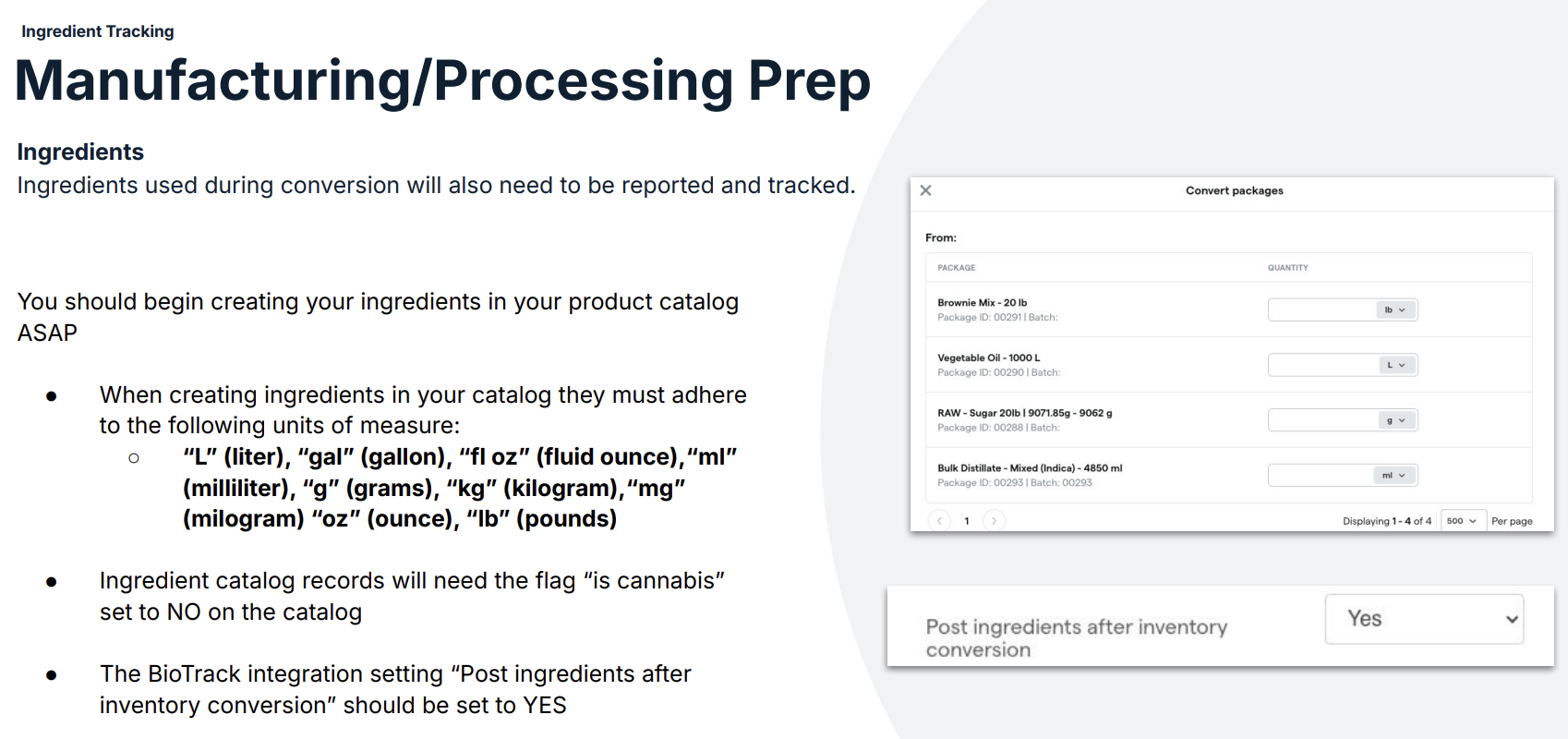
And then finally, for day zero when you have your BioTrack integration set up and the credentials input, on the integration settings page itself there's going to be a very specific flag only for manufacturers and processors called "post ingredients after inventory conversion". Again, only for manufacturers and processors does this flag need to be set to yes. This will then allow any ingredients applied during a conversion – my example here: oil, brownie mix and sugar – will also be posted as part of an ingredient during this conversion, as long as that flag is flipped to yes.
Dutchie Resources for Integration Support
Alrighty, folks. I want to wrap up this webinar with your resources. Where can you go to for help when you need help during the integration?
And I'm going to point you all first to the Dutchie Help Center, which has so much information for you all – from how-to guides to step-by-step tutorials that walk you through everything I just talked about. I have a video on how to bulk edit your catalog, what it's going to look like to push your cars and drivers, what it's going to look like to push your inventory into BioTrack. All of this is going to be documented and recorded so you can follow along in the process when you're ready to integrate.
Of course, you also have our State Laws Page that is updated with the latest compliance information that you can refer to as a resource.
And then as far as Dutchie support, we will have a dedicated inbox for the New York integrations:
ny-integrations-help@dutchie.com
Will be the inbox you can utilize if you have any questions leading up to your New York BioTrack integration. This will also be converted into a support ticket and you will be responded to in that manner through our support channels.
What do you do on day one? You're officially onboarded. You're live on BioTrack. From there, you will use our normal support pathways: POSSupport@dutchie.com
We also have a phone number you can call or our chat bot, which can connect you with an agent if needed.
Outside of the Dutchie scope, you also have resources through the OCM, which is their compliance inbox: compliance@ocm.ny.gov
Licensees are encouraged to message that inbox for general compliance questions.
BioTrack Specific Support
If you have a question that's for BioTrack that maybe has nothing to do with Dutchie or even compliance, you can go ahead and email: NYHelp@biotrackthc.com
You have plenty of resources to use, and I just encourage you all to take this content and take this webinar and use it as a call to action to start preparing for your integration. The more prepared you are, the more seamless and quick it's going to be when you're ready to start onboarding.
We at Dutchie are here for you during this transition. Thanks for reading!


